Parity Trade Monitor
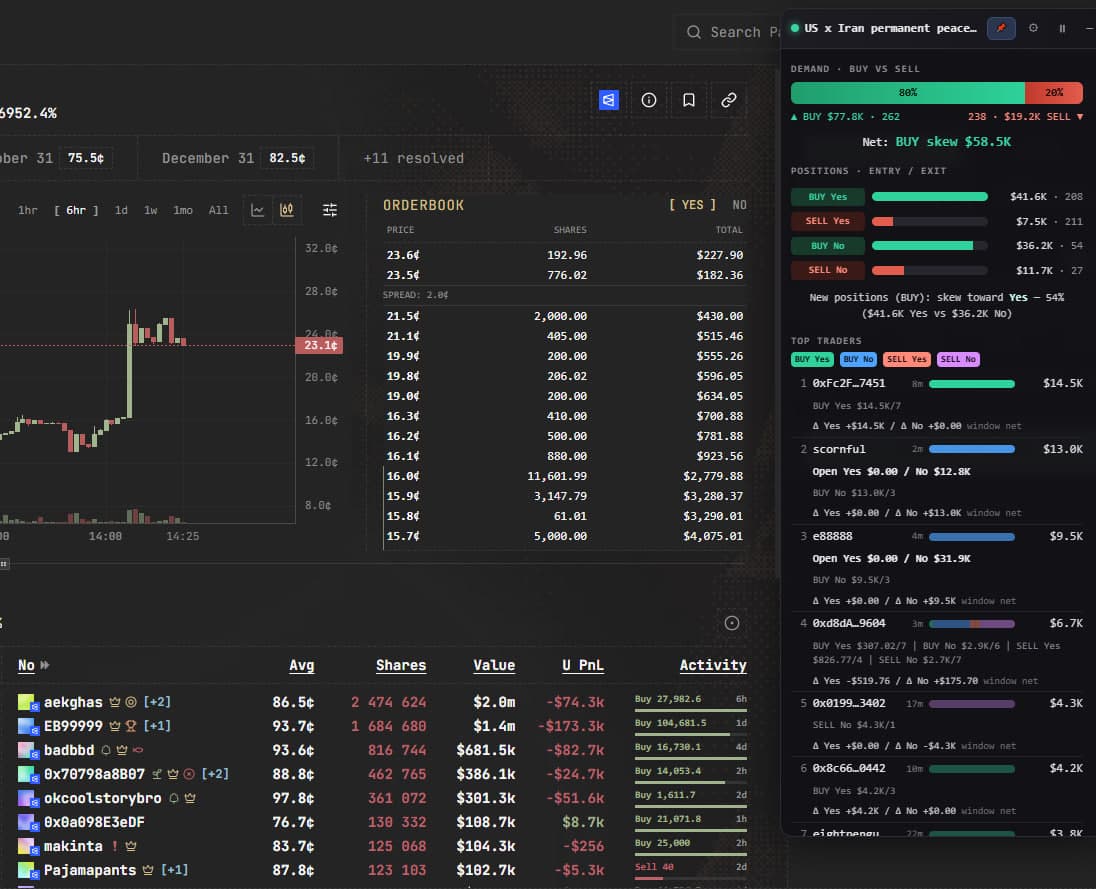
A live order-flow overlay for prediction markets. See BUY/SELL demand, positions, the biggest traders, whale alerts and AI analysis — right on the market page, across several markets at once.
What it does
BUY vs SELL demand
Instant net-flow read on the active market — how much money is hitting the bid vs the ask, and which side is winning right now.
Positions by outcome
See who is entering (BUY) and exiting (SELL) each outcome (Yes / No), with totals and trade counts per side.
Top traders
The largest players by volume, ranked, with profile links, verified badges, and whether each is a net buyer or seller.
Live trade flow
A time histogram (old → new) plus a live tick feed of the latest trades, so you can feel momentum building.
Whale alerts
Big trades above your threshold are highlighted, with optional desktop notifications and a sound chime the moment they land.
One-click AI analysis
Send the current snapshot to an AI model (via OpenRouter) and get a plain-English read on demand skew, who is entering vs exiting, and overall sentiment — pick the model you like.
Multiple markets at once
Pin any market into its own floating window. Each keeps polling and analysing on its own, and stays open as you browse other pages.
Built for streaming
Clean dark, draggable panels designed to look good on a 24/7 stream or a second monitor.
Every setting
Tune it to your style from the in-panel settings (the ⚙ button):
| Refresh interval | 3 / 5 / 10 / 30 seconds |
| Depth | 50 / 100 / 250 / 500 trades (auto-paginates beyond 100) |
| Minimum trade size | off / $10 / $100 / $1K / $5K filter |
| Whale threshold | $1K / $5K / $25K / $100K (highlight + alert) |
| Desktop notifications | on / off for whale trades |
| Sound alert | on / off chime on big trades |
| AI model | any OpenRouter model id (type it in the panel) |
| Per-window controls | pause, minimize, drag, pin / unpin |
Install in minutes
Add Tampermonkey
Free browser extension (Chrome, Edge, Firefox…).
Install the script
One click — the install guide is included.
Open a market
The live panel appears on predictparity.com.
Why traders use it
The edge isn’t the price — it’s seeing who is moving the money, and when. Here’s what the monitor gives you that the market page doesn’t.
See the real order flow, not just the price
Price tells you where the market is. This tells you why — how much money is buying vs selling right now, and which side is in control.
Catch the big moves the second they land
Whale trades above your threshold are highlighted with an optional desktop notification and sound, so you never scroll back and miss the trade that mattered.
Watch several markets at once
Pin any market into its own floating window. Each keeps polling and analysing independently and stays open while you browse other pages — a real trading desk in your browser.
Turn raw trades into a read in one click
The AI summary condenses hundreds of trades into a few sentences on sentiment and positioning — useful when you don't have time to eyeball the whole feed.
Who it’s for
Active Parity traders
Anyone trading on predictparity.com who wants a fast, honest read on demand, positioning and the biggest players before placing a trade.
Streamers & content creators
Clean dark, draggable panels look great on a 24/7 stream or a second monitor — a professional live dashboard with zero setup on screen.
Market watchers & researchers
Track whale behaviour and outcome imbalance across multiple markets without building anything — the data is visualised for you in real time.
See it in action
Drop in a screenshot of the live panel and a link to your 24/7 stream.
FAQ
What exactly is it?
A userscript (a small browser add-on) that draws a live panel on top of predictparity.com market pages. It reads the market’s own public trade feed and visualizes order flow in real time. There’s no separate app to run.
How do I install it?
Install the free Tampermonkey extension in your browser (Chrome, Edge, Firefox, etc.), then add the script. Full step-by-step instructions are included after purchase.
Do I need the AI part?
No. The whole monitor works without it. The optional AI summary calls a model through OpenRouter and returns a short read on sentiment and positioning — you can pick which model to use, or ignore the feature entirely.
How does the AI analysis work?
It builds a compact snapshot of the current trade window (demand, positions, top traders) and sends only that summary to your chosen OpenRouter model. It returns analytical commentary in plain English — not financial advice.
Which browsers work?
Any desktop browser that supports Tampermonkey (or a compatible userscript manager).
What do I get and is there a refund?
You receive the script file plus an install guide, delivered instantly after checkout. State your refund policy here — billing and receipts are handled by the payment provider.
The monitor and its AI summary provide analytical commentary only — this is not financial advice.
Get Parity Trade Monitor
Instant download after checkout. $300, one-time.